
Common Nerdle Mistakes & How to Fix Them
2 years ago · Updated 11 months ago
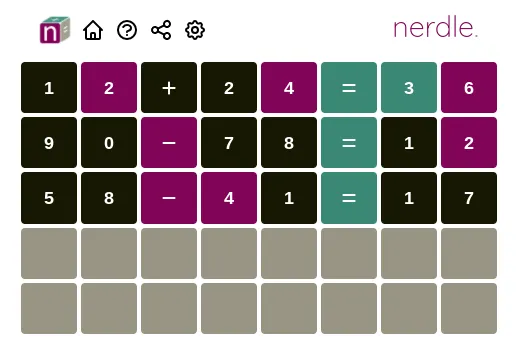
Struggling with Nerdle? Many players repeat the same common Nerdle mistakes that kill their streak. This guide shows how to avoid Nerdle errors with practical fixes, plus links to the daily Nerdle answer and the full Nerdle archive.
See Today’s Nerdle Answer
best nerdle opener
Browse the Nerdle Archive
🚫 1) Repeating Digits/Operators Marked Black
One of the biggest Nerdle mistakes is reusing digits or symbols that already turned black in previous guesses.
- Fix: If a digit/operator is black, eliminate it from your pool.
- Example: If “7” is black in attempt #1, avoid using 7 again.
⚠️ 2) Ignoring Color Feedback
Some players guess randomly instead of reading tiles. Color hints are your roadmap:
- 🟢 Green: correct symbol in the correct position — lock it.
- 🟣 Purple: in the equation but misplaced — reposition it.
- ⬛ Black: not used — remove from future guesses.
❌ 3) Using Only One Operator Type
Focusing only on addition or multiplication limits discovery and slows progress.
- Fix: Mix operators early (e.g., addition + subtraction) to probe structure.
- Example: Instead of only “5+7=12”, try “8+3−1=10”.
⏳ 4) Random, Low-Information Openers
Low-info openers waste attempts and reduce your chance to solve in time.
- Fix: Use a high-information opener with varied digits and 2 operators.
- Example: “6×3−2=16” (or “6*3-2=16”) tests multiple elements quickly.
Need help with strong openers? See nerdle strategy.
📐 5) Wrong “=” Position & Invalid Equations
Keeping “=” in the same spot after purple feedback, or creating invalid equations, blocks useful signals.
- Fix: If you see purple, move the “=” sign and reorganize operators.
- Validity: Make sure every attempt is a valid equation; invalid tries waste feedback.
⏱️ 6) When Does Nerdle Reset: Avoiding Tilt & Rushing
Playing right before/after the reset time can lead to rushed mistakes or using the previous puzzle by accident.
- Fix: Nerdle resets daily at 00:00 GMT/UTC (~20:00 ET / 17:00 PT previous day; 01:00 CET; 10:00 AEST). When in doubt, refresh.
- Tip: Check Nerdle Answer Today to confirm the current puzzle and see hints.
🧠 7) Not Practicing Purposefully
Random practice doesn’t build intuition. Use custom Nerdle routines to train openers and color-driven repositioning.
- Warm-up: three openers that mix operators.
- Speed rounds: max three attempts, focus on moving purples.
- Review: scan the archive for recurring totals and operator combos.
📌 FAQ: Nerdle Mistakes & Solutions
Why do I keep losing at Nerdle?
Common causes include repeating black tiles, ignoring color feedback, using only one operator, and invalid equations. Apply the fixes above and review the Nerdle archive for patterns.
How can I get better at Nerdle?
Use high-information openers, follow color clues, and practice with custom Nerdle routines. Don’t miss the strategy guide.
Where can I find today’s Nerdle answer and hints?
Go to Nerdle Answer Today for hints, reset time and the spoiler reveal.
When does Nerdle reset?
Nerdle resets daily at 00:00 GMT/UTC (~20:00 ET / 17:00 PT previous day; 01:00 CET; 10:00 AEST). After the reset, refresh the Answer Today page.
Leave a Reply